Half of this game is a word puzzle and half of it is a physics simulation, and every interesting
problem turned up exactly where the two touch.
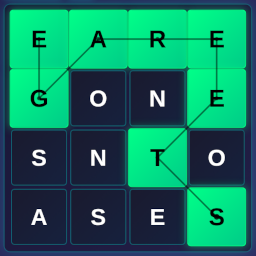
FruitFall is a grid of lettered tiles with fruit caught in it. You spell words by selecting tiles; the tiles you use
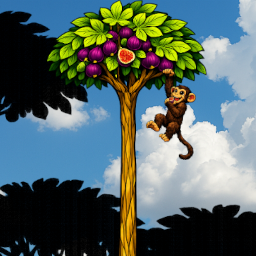
pop, everything above them falls into the space, and the fruit — real physics bodies rather than grid cells —
tumbles down through whatever route you have opened. Get a piece out and it is saved. Lose it and it is not.
Meanwhile the canopy above presses down a row at a time, so the board you are solving is also shrinking.
The grid is not all letters. There is stone, there is wood you can destroy, and there is steel you cannot. Spell a
word of six letters or more and you earn a bomb, which clears a region — except the steel, which ignores it
completely. Steel is the level designer's way of saying no, not that way, and it is the only thing in the
game that is not negotiable.
Fruit that gets stuck
A puzzle where you open a path and something rolls down it has an obvious failure mode: the something stops halfway.
A piece of fruit wedges on a ledge, or settles into a notch between two blocks, and sits there while the player
stares at a route that is visibly clear.
Real physics does that constantly, and correctly. It is still a terrible experience, because the player has solved
the puzzle and the game is refusing to acknowledge it.
So stuck fruit wiggles. Anything that has not moved for a few frames gets a gentle horizontal nudge; if it still has
not moved, the nudge flips direction, with a small upward hop to lift it over whatever lip is holding it. Given a
few seconds it works itself loose and carries on. It looks like impatience, which is a much friendlier thing for an
object to look like than paralysis.
Force is not acceleration
That worked beautifully at one size, and the fruit comes in ten of them.
The first version applied a fixed horizontal force to anything stuck. The small fruit shot sideways as though
flicked. The large fruit barely acknowledged it. Which is not a bug in the code — it is the code doing exactly what
it was told, and being told the wrong thing.
The physics is the physics I was taught at school and had comfortably forgotten: force equals mass times
acceleration. A fixed force produces an acceleration that falls away as the mass rises, and the smallest fruit in
this game and the largest differ in area by a factor of a hundred, with mass following. A nudge that was a decisive
shove on the small stuff was a rounding error on the big.
The fix is to scale the force with the body's own mass, so that what stays constant across every piece of fruit is
the acceleration — how briskly it starts moving — rather than the push. The smallest now gets exactly what
it got before, the largest gets many times as much, and both behave like fruit being nudged rather than like two
objects obeying different rules.
Two other numbers had to follow the same logic. How long a piece of fruit waits before giving up on one direction and
trying the other now shrinks with size: a small one is patient because a small push usually works eventually, while
a big one has to try the other way sooner, because if it has not shifted by now it is not going to. And the upward
hop on each direction flip scales up too, because lifting a large mass over a ledge edge takes more than lifting a
small one — a hop tuned for the smallest fruit does not even lift the largest clear of what is holding it.
None of that is clever. It is one physical relationship applied consistently in three places, and I got it wrong in
all three because I was thinking of the wiggle as an animation rather than as a force. The moment a thing is a
physics body, it stops obeying your intentions and starts obeying the equations.
What a much-edited codebase accumulates
The second half of the story is less picturesque and probably more useful.
This game was modified a great deal over a long stretch — features added, features changed, ideas half-implemented
and abandoned. At some point troubleshooting it started feeling harder than it should, so I stopped adding and read
the whole thing top to bottom instead.
Five real bugs came out of that reading, and not one of them had ever thrown an error.
A duplicate key. Two of the state fields were declared twice in the same object literal, with
different values. That is legal JavaScript — the second one silently wins and the first is discarded. Nothing warns
you. The value you carefully set at the top of the file simply never existed.
A counter that was never a number. A key used to force a fresh level load was incremented on every
load — added to a value that had never been initialised. So it was NaN from the first level onward, and
stayed NaN, because adding one to NaN is NaN. Arithmetic on undefined does
not complain, it just quietly produces a value that is not equal to anything, including itself.
A function that did not exist. The canopy-raising call was there in the component, spelled
correctly, doing nothing, because no such function had ever been written on the store.
A feature nobody could see. This is the one that stung. The bomb — earned with a six-letter word,
the reward for the hardest thing the game asks of you — was fully implemented, complete, and permanently invisible,
because the three props that tell the word bar to show the button were never passed to it. The logic ran. The button
could not appear. A whole mechanic had effectively been shipped into a cupboard.
Props that were never unpacked. Similarly, two handlers were passed down to the letter grid and
never destructured at the other end, so clicking an earlier tile in your selection to trim back to it did nothing at
all. The wiring went in one end and stopped.
Every one of these is the same species: a mistake that JavaScript is entirely happy with. No crash, no warning, no
red text — just a feature that is not there, and no reason to suspect it, because you remember writing it.
And the things that were doing nothing
The same read turned up a surprising amount of code that was simply never reached. An entire module for extracting
shapes from tile artwork, imported by nothing. A responsive scaling hook, imported by nothing. A helper for testing
whether a cell is solid, called by nothing. An empty click handler. A parameter accepted by a function and then
immediately thrown away.
All of it deleted, and the codebase got noticeably easier to think about — not because the dead code was doing harm,
but because every time you read past something you have to ask what it does, and asking that question about a thing
that does nothing is a small tax you pay over and over.
Two pieces of architecture came out of it too. The storage-key prefix was being computed independently in two places
from the page's own path — which is how the app keeps its saved data separate from every other game on the site —
and is now one shared constant, because a value derived twice is a value that can disagree with itself. And there
was a well-built, general-purpose selection hook sitting in the project, unused, while a rougher copy of the same
logic lived inlined in the component that needed it. The hook had been written, and then the thing it was written
for had been built again by hand.
What I would tell myself
The physics half of this game went wrong because I applied a rule inconsistently. The code half went wrong because
nothing in the language I am writing in requires consistency at all: it will happily let me declare the same thing
twice, do arithmetic on nothing, call a function that does not exist, and pass props to a component that never opens
them.
The defense against the first is understanding the rule. The defense against the second turned out to be nothing more
sophisticated than reading the whole thing, in order, without adding anything. I had written every line of it, and I
found five bugs in an afternoon, because writing code and reading code are different activities and I had only been
doing one of them.